


Gaming PC Upgrade Guide: What Should You Upgrade First?
A gaming PC that once delivered smooth, responsive gameplay can start feeling slow as newer games demand more from your hardware. But upgrading everything at once is rarely necessary or budget-friendly. The key is identifying the component that is actually limiting your performance and upgrading it first. Whether you are experiencing low FPS, stuttering, long loading times, or insufficient storage, the right upgrade can make a noticeable difference without wasting money. This gaming PC upgrade guide explains which components deserve priority, how to identify bottlenecks, and how to plan upgrades that deliver the best performance for your budget.
1. Upgrade Your GPU for Better Gaming Performance
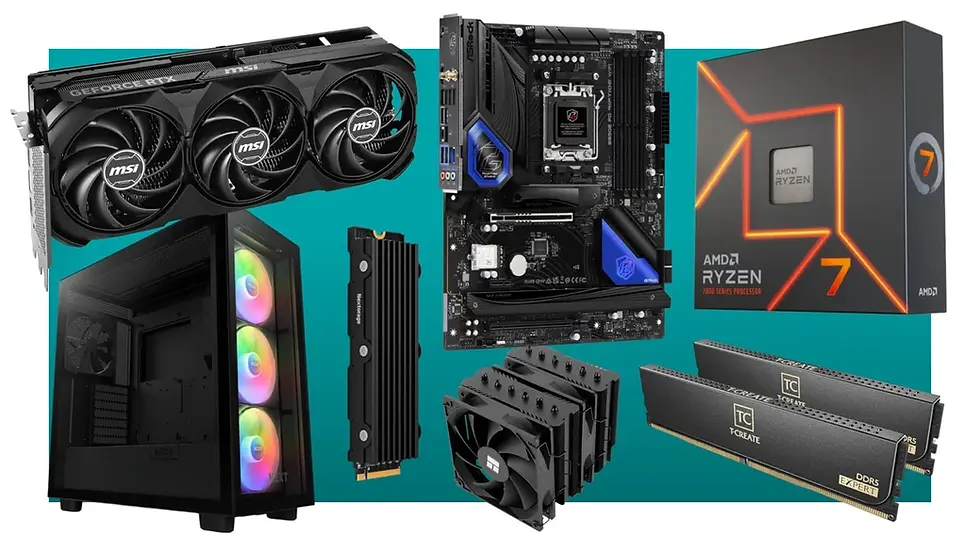
For most gamers, the graphics card (GPU) is the first component worth considering when upgrading. The GPU handles rendering, resolution, textures, lighting, and visual effects, making it especially important for modern AAA games.
If your games struggle to maintain playable frame rates at your monitor's resolution, a stronger GPU can provide a substantial improvement. For example, moving from an older mid-range graphics card to a newer performance-class GPU can significantly improve 1080p or 1440p gaming, particularly when using high graphical settings.
However, don't automatically buy the most powerful GPU available. Your CPU, power supply, and case airflow must also support the upgrade. A powerful GPU paired with an aging processor may create a CPU bottleneck, limiting the performance you actually receive.
Before upgrading, monitor GPU usage while gaming. Consistently high GPU utilization combined with low frame rates is a strong indication that your graphics card is the limiting component.
2. Upgrade RAM and Storage for Smoother Gameplay
RAM and storage upgrades are often more affordable than a complete platform upgrade and can make your system feel considerably more responsive.
For modern gaming, 16GB of RAM remains a practical baseline for many systems, while 32GB can be beneficial for demanding games, multitasking, streaming, and background applications. If your PC frequently uses nearly all available memory, adding RAM may reduce slowdowns and stuttering.
Storage is another common upgrade opportunity. If your operating system or games are installed on an older hard disk drive, switching to an NVMe SSD can dramatically improve boot times, game loading, and general system responsiveness.
Keep in mind that an SSD generally won't transform your average FPS in the same way a GPU upgrade can. Its biggest benefits are faster loading and a more responsive overall experience.
3. Upgrade Your CPU, Cooling, and Power Supply Wisely
If your GPU isn't being fully utilized while your CPU is consistently working near maximum capacity, the processor may be holding your gaming performance back. This is particularly noticeable in CPU-heavy games, competitive titles targeting high frame rates, and situations where you use a powerful graphics card with an older processor.
Before replacing the CPU, check motherboard compatibility. A newer processor may require a different socket, chipset, or BIOS version, potentially turning a simple CPU upgrade into a larger platform upgrade.
Cooling also matters. If your CPU regularly reaches high temperatures and reduces its clock speeds, better cooling can help maintain consistent performance.
Finally, don't overlook the power supply. A new high-performance GPU may require more power and appropriate connectors. A quality PSU with sufficient capacity and the correct efficiency rating is essential for system stability.
Conclusion
The best gaming PC upgrade isn't necessarily the most expensive one—it's the component that removes your current performance bottleneck. Start by measuring your system rather than guessing, then upgrade according to your actual gaming needs and budget. A well-planned upgrade can extend the life of your PC while delivering better performance where it matters most.
Actionable takeaways:
Check GPU and CPU utilization before buying new hardware.
Prioritize the GPU when graphics performance is the main limitation.
Consider 16GB–32GB RAM depending on your games and multitasking needs.
Move from an HDD to an SSD for faster loading and responsiveness.
Verify motherboard, PSU, cooling, and compatibility before upgrading.
For more practical PC advice and technology insights, techies2talk can help you make smarter hardware decisions. As games continue to become more demanding, planning your upgrades strategically will help keep your gaming PC ready for what's next.

Comments